

Define your brokerage’s technical requirements
Before choosing software or servers, you need to understand how your brokerage will operate.
Start with your execution model and the number of clients you expect to serve. These two things will influence many of your technical decisions.

A-Book, B-Book, and Hybrid execution models
Your execution model determines what happens to your clients’ trades and who takes the market risk.
There are three main options:
- A-Book. You pass client trades to external liquidity providers. You’ll need reliable connectivity and a Bridge to route these orders.
- B-Book. Your brokerage takes the other side of client trades and manages the resulting market exposure internally.
- Hybrid. You combine both approaches. Some trades are handled internally, while others are sent to liquidity providers.
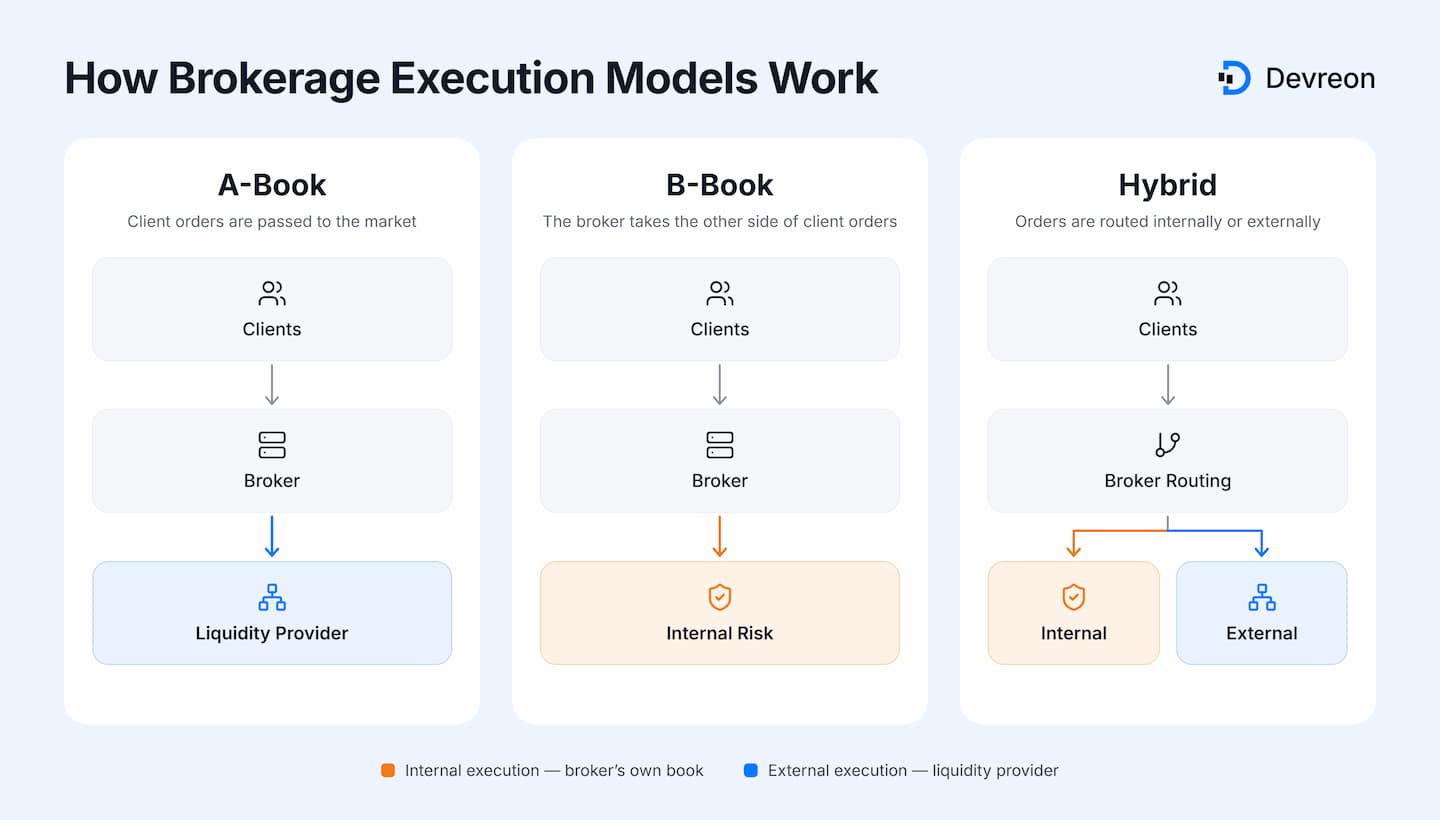
For example, you might use a Hybrid model and decide which client groups or instruments should be routed externally.
Each model has different requirements for trade execution, liquidity connectivity, and risk management.
You don’t need to configure all these rules yet. We’ll look at how order routing works and how to manage trading risks in the next sections.
Estimate your trading infrastructure requirements
You don’t need to buy the most powerful servers on the market. You need infrastructure that fits your business.
Before choosing your setup, estimate:
- Trading accounts. How many active traders do you expect at launch and in the next year?
- Trading volume. How many orders and transactions will your systems need to process, especially during busy market hours?
- Client groups. Will you offer different leverage, spreads, or trading conditions?
- Instruments. Forex only, or also metals, indices, and other CFDs?
- Integrations. Which external systems will your brokerage need?
- Growth. Will you operate one brand or several? Do you expect to need additional trading servers?
You won’t have exact numbers for everything, and that’s fine. Start with realistic estimates. These numbers will help you plan your server capacity and choose the right technology.
Later, I’ll explain how to turn them into a working infrastructure and test whether it can handle your expected trading activity.
Choose your trading platform: MT4, MT5, or both?
Your next decision is choosing a trading platform.
Most Forex brokers consider MetaTrader 4 (MT4) and MetaTrader 5 (MT5). Both are developed by MetaQuotes, but they’re not the same.
MT4 vs. MT5: what’s the difference?
MT4 was designed mainly for Forex trading. Many traders still use it because they’re familiar with the platform and have trading robots and indicators built for it.
MT5 is a newer platform with more features. It supports more order types, additional financial markets, and a more modern server architecture.
There are also some technical differences worth knowing:
| MT4 | MT5 | |
|---|---|---|
| Main focus | Forex trading | Multi-asset trading |
| Programming language | MQL4 | MQL5 |
| Order types | 4 pending order types | 6 pending order types |
| Position accounting | Hedging | Hedging and netting |
| Server architecture | External only | More modern, distributed architecture |
If I were starting a new brokerage today, I’d look at MT5 first. But if your target clients specifically need MT4, that changes the decision.
You can also offer both platforms, although you’ll have two separate trading environments to maintain.
What about the server infrastructure?
When traders open MT4 or MT5 on their phones, they only see a small part of the system.
Behind the application, you have trading servers that process orders and manage accounts, access components that handle connections, and tools your team uses to manage trading operations.
MT4 and MT5 have different architectures, and their server setups are not interchangeable.
We’ll look at hosting, server configuration, performance, and backups in the infrastructure section.
“Traders only see the trading platform. But behind every trade, there’s a whole system that needs to work together. If one part fails, the client may feel it.”
– Alla Karpuk, Project Manager at Devreon
Your own license or White Label?
There are two common ways to access a trading platform.
Your own license gives you greater control over the trading environment and its configuration. But it also comes with higher costs and technical responsibilities.
White Label allows you to operate through another company’s platform infrastructure. It can be easier to get started, but your options depend on the provider.
Here’s an example.
Imagine you want to add a custom MT5 plugin.
With your own infrastructure, you generally have more control over that decision.
With White Label, you may need your provider’s permission, or the integration may not be possible.
Before choosing, ask what you can configure yourself, which integrations are allowed, and what happens if you decide to move to your own infrastructure later.
Also, check current licensing options and conditions directly with MetaQuotes or the relevant provider. Don’t assume every option is available.
Do you need more than one trading server?
Not necessarily.
A new brokerage may start with one trading server environment. As the business grows, you might need additional servers for different brands, client groups, or operational requirements.
But adding servers also means more infrastructure to maintain.
I’ll explain when multiple servers make sense and what you need to consider before adding them in the server infrastructure section.
Is MT4 or MT5 enough to run a brokerage?
No. MetaTrader handles the core trading operations, but it doesn’t cover everything your business needs.
You’ll also need other systems, such as:
- Bridge to connect with liquidity providers and manage trade routing.
- CRM and Client Portal to handle client accounts and business operations.
- Risk Management to monitor and control trading risks.
- Monitoring to detect technical and trading issues.
- Reporting to collect and analyze business and trading data.
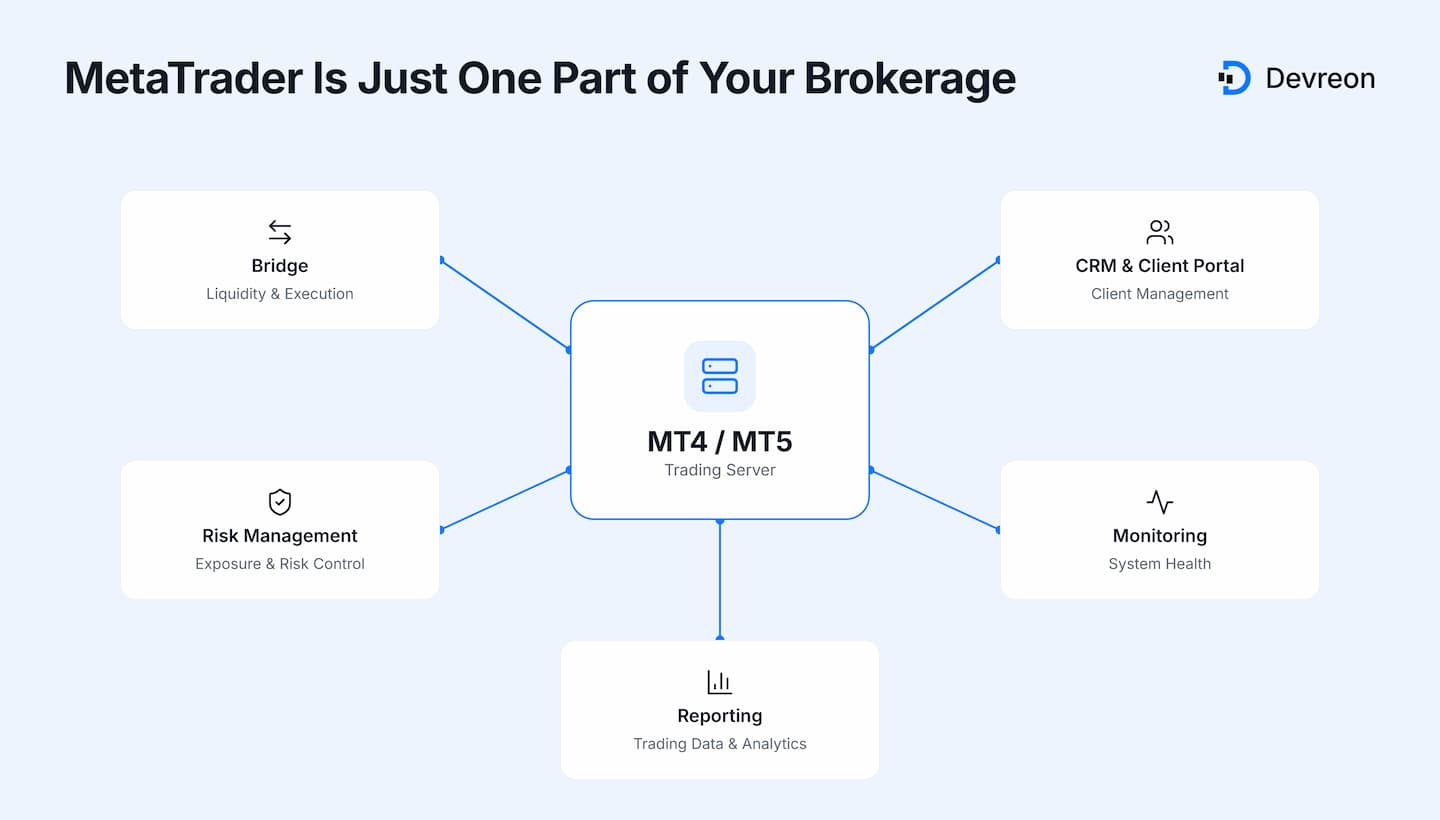
Don’t worry about choosing all these tools right now.
In the next section, I’ll show you how they fit together and what a complete brokerage technology architecture looks like.
Design your forex brokerage technology architecture
Now that you’ve chosen your trading platform, let’s look at how everything fits together.
Think of MetaTrader as the heart of your brokerage. It handles trading accounts and orders.
But it needs other systems around it to connect to liquidity providers, manage clients, control risks, and monitor operations.
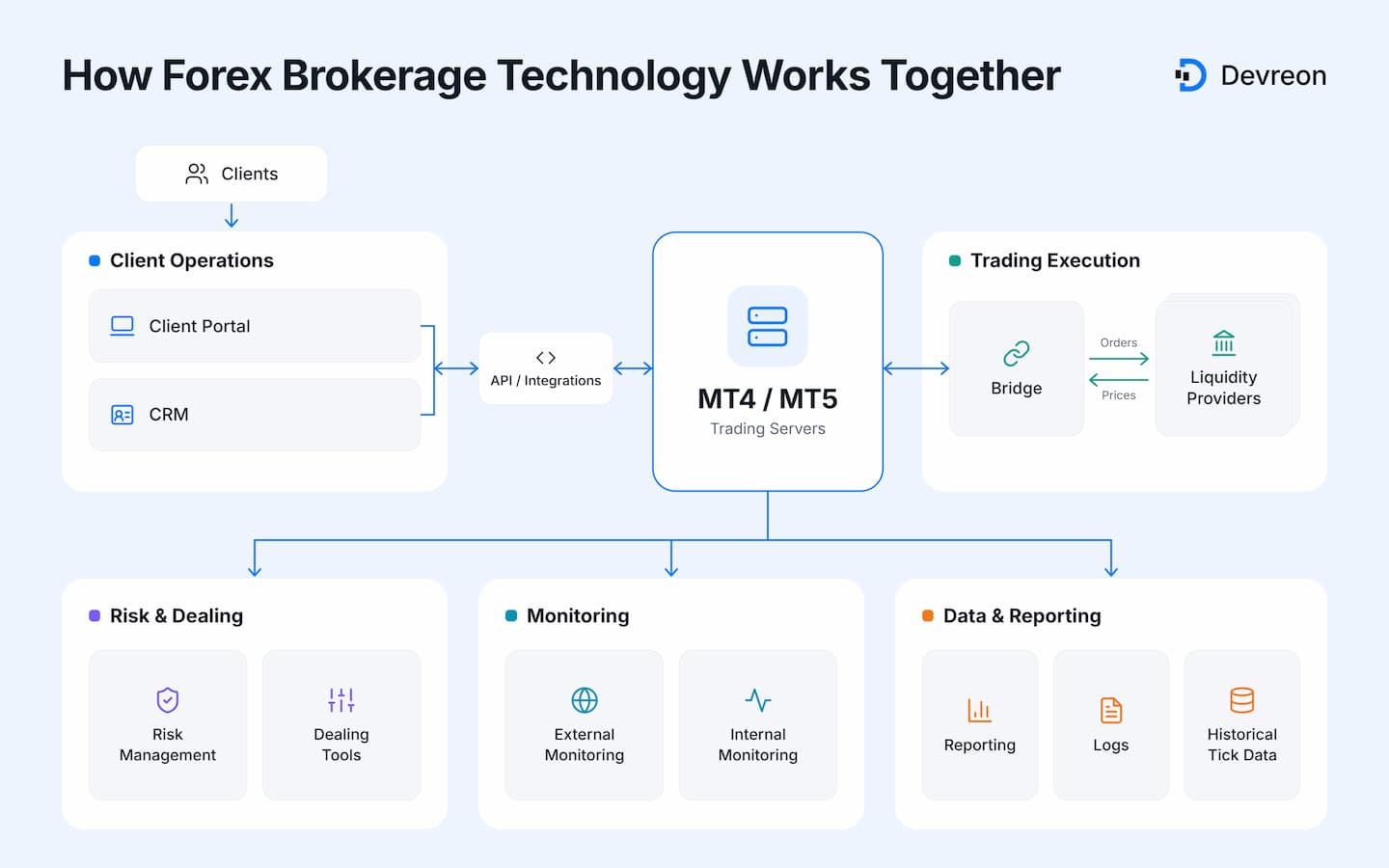
Here’s what your technology setup should include.
Trading server infrastructure
Your MT4/MT5 servers are where trading happens. They process orders, manage accounts, and keep trading records.
For stable operations, you need reliable hosting, enough processing capacity, backups, and a recovery plan in case something fails.
You should also be able to add servers as your business grows.
We’ll cover server configuration, hosting, and capacity planning in the next section.
Liquidity providers and Bridge technology
Your clients need prices to trade, and their orders need to be executed.
Liquidity providers (LPs) supply market prices and can execute trades sent to them.
A Bridge connects your MT4/MT5 platform to these providers. It receives price feeds and routes orders according to your execution rules.
For example, if you work with two liquidity providers, your Bridge can help decide where to send an order based on your configured rules.
We’ll look at liquidity connections, routing, and execution quality in more detail later.
CRM, Client Portal, and integrations
MetaTrader manages trading accounts, but you also need to manage the people behind those accounts.
That’s where CRM and Client Portal systems come in.
- CRM. Helps your team manage clients, onboarding, and customer relationships.
- Client Portal. Lets clients register, complete identity verification (KYC), open trading accounts, and request deposits or withdrawals.
- Integrations. Connect these systems to MetaTrader through APIs and other interfaces so information can move between them.
Here’s a simple example.
A client completes registration in your portal. After the necessary checks, the system creates a trading account in MT5 and sends the login details back to the portal.
Without proper integrations, your team may have to do these tasks manually.
Risk management and Dealing tools
Every brokerage needs to understand how much trading risk it’s taking.
MetaTrader provides basic trading controls, but you may need additional tools to see the full picture.
These tools help you:
- Monitor open positions and total exposure.
- Control leverage and risk limits.
- Analyze trading activity and execution.
- Give dealers the information they need to make decisions.
For example, if many clients open large positions on the same instrument, your dealing team should be able to see the combined exposure, not just individual trades.
We’ll discuss how to manage these risks in the dedicated risk management section.
Server and trading monitoring
One thing I always tell brokers: a connected server doesn’t necessarily mean everything is working well.
Your MT5 server may be online, but orders could be taking longer than usual to process.
That’s why you need two types of monitoring:
- External monitoring checks whether your trading servers are reachable from outside.
- Internal monitoring checks what’s happening inside your infrastructure, including performance, errors, logs, and plugins.
Together, they help your technical team understand whether the platform is available and working as expected.
I’ll explain what to monitor and how to set up useful alerts later in this guide.
Reporting and trading data management
Your trading platform generates a lot of information: orders, trades, account activity, price changes, and system events.
You need ways to store, access, and analyze that information.
Three important parts are:
- Reporting. Helps your team understand trading activity and business results.
- Logs. Record system events and errors so you can investigate problems.
- Historical tick data. Stores past price updates for analysis and trade investigations.
You may also need to send trading data from MT4/MT5 to your CRM, reporting systems, or other internal tools through APIs.
Connect liquidity providers and configure trade execution
When a client clicks Buy or Sell, they expect their trade to be executed quickly and at the right price.
But several systems have to work together to make that happen.
Let’s look at how your brokerage receives prices, connects to liquidity providers, and executes trades.
Liquidity connectivity and aggregation
Liquidity providers (LPs) are banks, financial institutions, or specialized companies that provide market prices and liquidity for trading.
Your brokerage receives price feeds from these providers and uses them to offer prices to clients.
You can work with one LP or connect to several.
Why would you need more than one?
Different providers may offer different prices, available liquidity, and trading conditions. Having several sources gives you more options.
This is where liquidity aggregation comes in.
Instead of working with each provider separately, a liquidity aggregator combines their price feeds and available liquidity into one system.
Your Bridge can then use this information to select an appropriate liquidity source for an order.
Order routing and execution rules
Let’s follow a simple trade.
A client opens MT5 and clicks Buy EUR/USD.
Here’s what happens in a typical A-Book setup:
- MT5 receives the client’s order.
- The Bridge processes it according to your routing rules.
- The order is sent to the selected liquidity provider.
- The provider returns the execution result.
- MT5 updates the client’s trade.
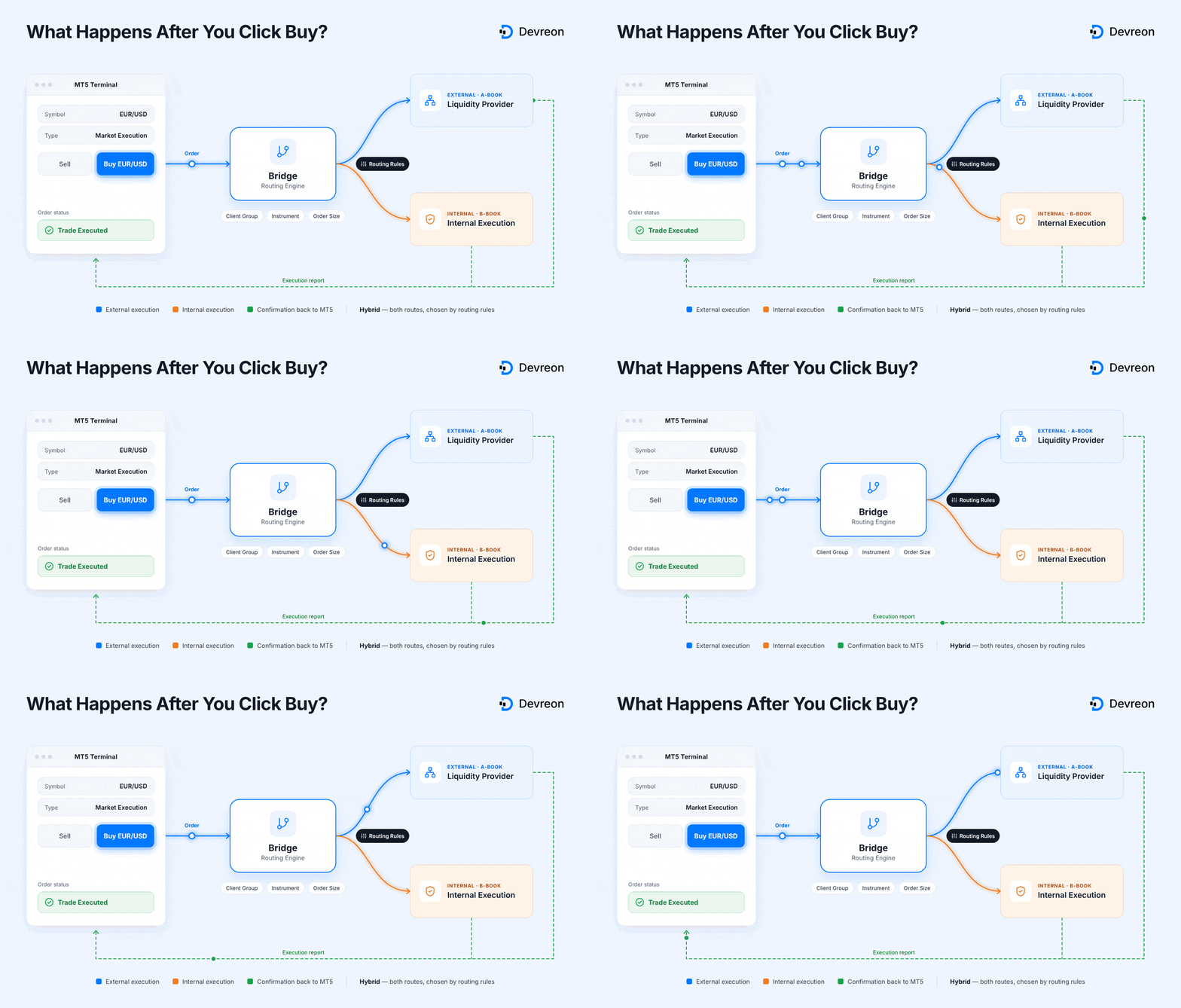
Your execution model determines how this process works.
- A-Book. Trades are routed to external liquidity providers.
- B-Book. Trades are handled internally, with the brokerage taking the market exposure.
- Hybrid. Some trades are handled internally, while others are routed externally.
For example, you might configure different routing rules for different client groups, instruments, or order sizes.
Your routing rules shouldn’t be fixed forever.
As your business grows, you may add liquidity providers, introduce new instruments, or change how you manage exposure.
Managing spreads, slippage, and latency
Three things have a direct impact on your clients’ trading experience.
Spread is the difference between the buying and selling price.
For example, if EUR/USD has a bid price of 1.10000 and an ask price of 1.10010, the spread is 1 pip.
Slippage happens when a trade is executed at a different price from the one requested. This can be positive or negative, especially when the market moves quickly.
Latency is the time it takes for information or orders to travel between systems.
Here’s an example.
A client clicks Buy at 1.10010. But while the order is traveling to the liquidity provider, the price changes to 1.10015.
The trade may be executed at the new price, depending on your execution settings and available liquidity.
This doesn’t automatically mean something is wrong. Slippage is a normal part of market execution.
But excessive delays, frequent rejections, or unusual price differences can indicate a problem.
That’s why I recommend tracking:
- Order execution time.
- Slippage and rejection rates.
- Price feed delays and interruptions.
- Connection stability with each liquidity provider.
These numbers help you understand whether your execution system is working as expected.
Testing Bridge performance under load
A Bridge may work perfectly when your brokerage processes 100 trades per minute.
But what happens when that number suddenly becomes 10,000?
During major economic announcements, trading activity can increase very quickly. Your Bridge needs to handle that traffic without creating serious delays or failures.
This is why we run load tests.
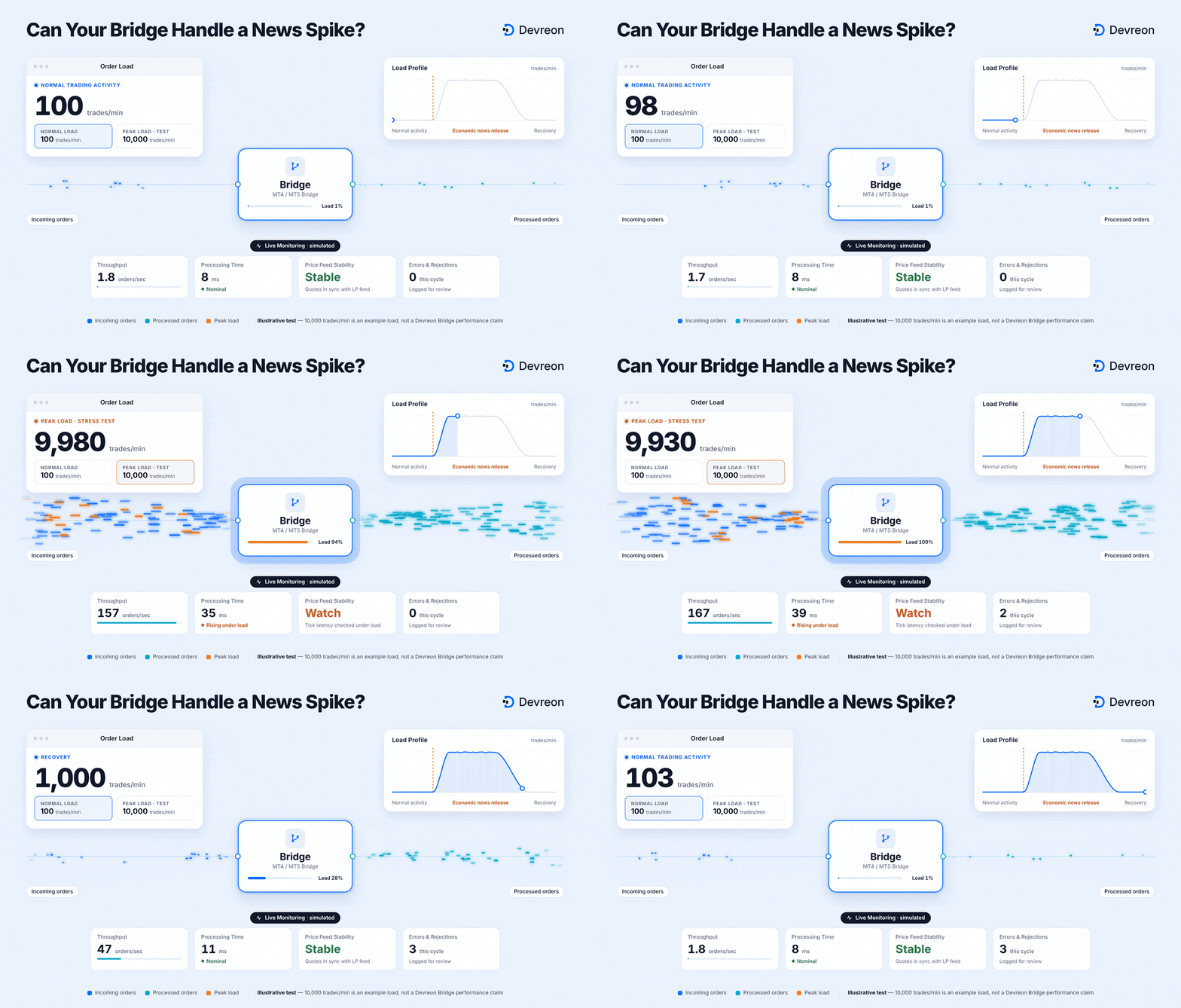
We simulate high trading activity and check:
- How many orders Bridge can process per second.
- How quickly orders are processed.
- Whether price feeds remain stable.
- Whether errors, rejections, or processing delays increase under load.
Real Bridge case study: 16 servers, 40M trades/day
One of Devreon clients is a large international Forex and CFD broker with over 1.5 million clients.
As the business grew from one trading server to 16, its previous Bridge struggled with slow execution, unstable price feeds, and technical issues.
The broker switched its trading activity to Devreon Bridge.
Today, the system handles:
- 40 million trades per day
- 1 million trades per minute at peak
- 16 MT4/MT5 servers
- Zero reported failures since reaching the current trading volume
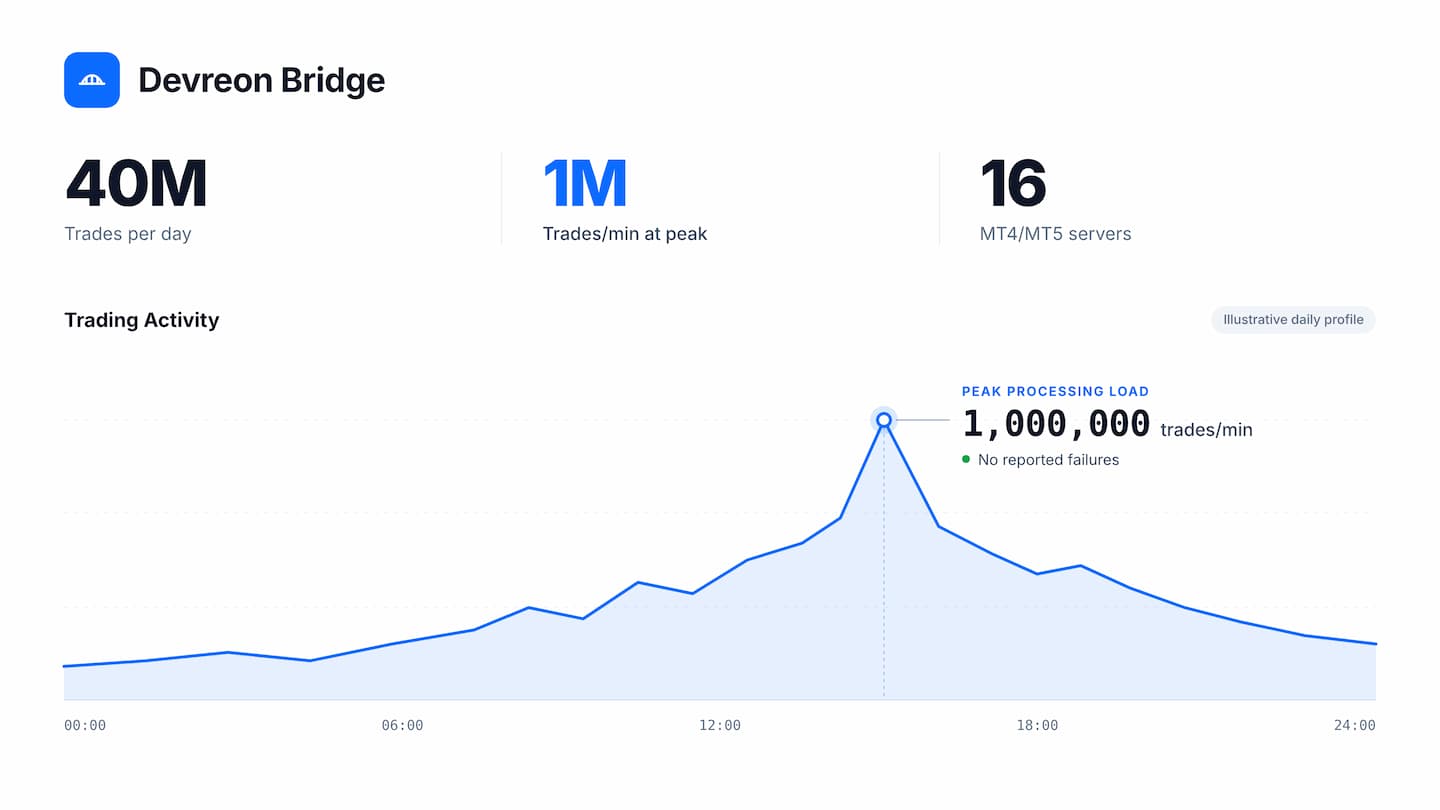
For me, this is a good example of why Bridge performance matters.
Your trading volumes can grow very quickly, and your technology needs to keep up.
Implement risk management from day one
Every Forex broker takes risks. The question is whether you can see and control them.
Don’t wait until your trading volumes grow. Risk management should be part of your infrastructure from the first day.
Exposure monitoring and risk limits
Exposure is the amount of market risk your brokerage holds.
For example, imagine hundreds of clients open Buy positions on EUR/USD.
If your brokerage keeps these trades on its B-Book, a sharp rise in EUR/USD could mean significant losses for you.
You need to see your total exposure across clients, groups, and instruments, not just individual positions.
Tools like Devreon Exposure Tracking help brokers monitor this exposure and identify where risks are building up.
You can also set risk limits and decide what action to take when exposure becomes too high.
High leverage management
High leverage attracts traders, but it also increases potential losses and the speed at which risks can grow.
You don’t necessarily need to stop offering high leverage.
You need rules to control it.
For example, you can automatically reduce the maximum available leverage when a client’s position size exceeds a certain limit or before major market events.
This helps you offer flexible trading conditions without taking unnecessary risks.
Dealing operations and trade analysis
Your dealing team needs to understand what’s happening across your trading platform.
Dealers review trading activity, investigate unusual trades, check execution problems, and monitor the brokerage’s exposure.
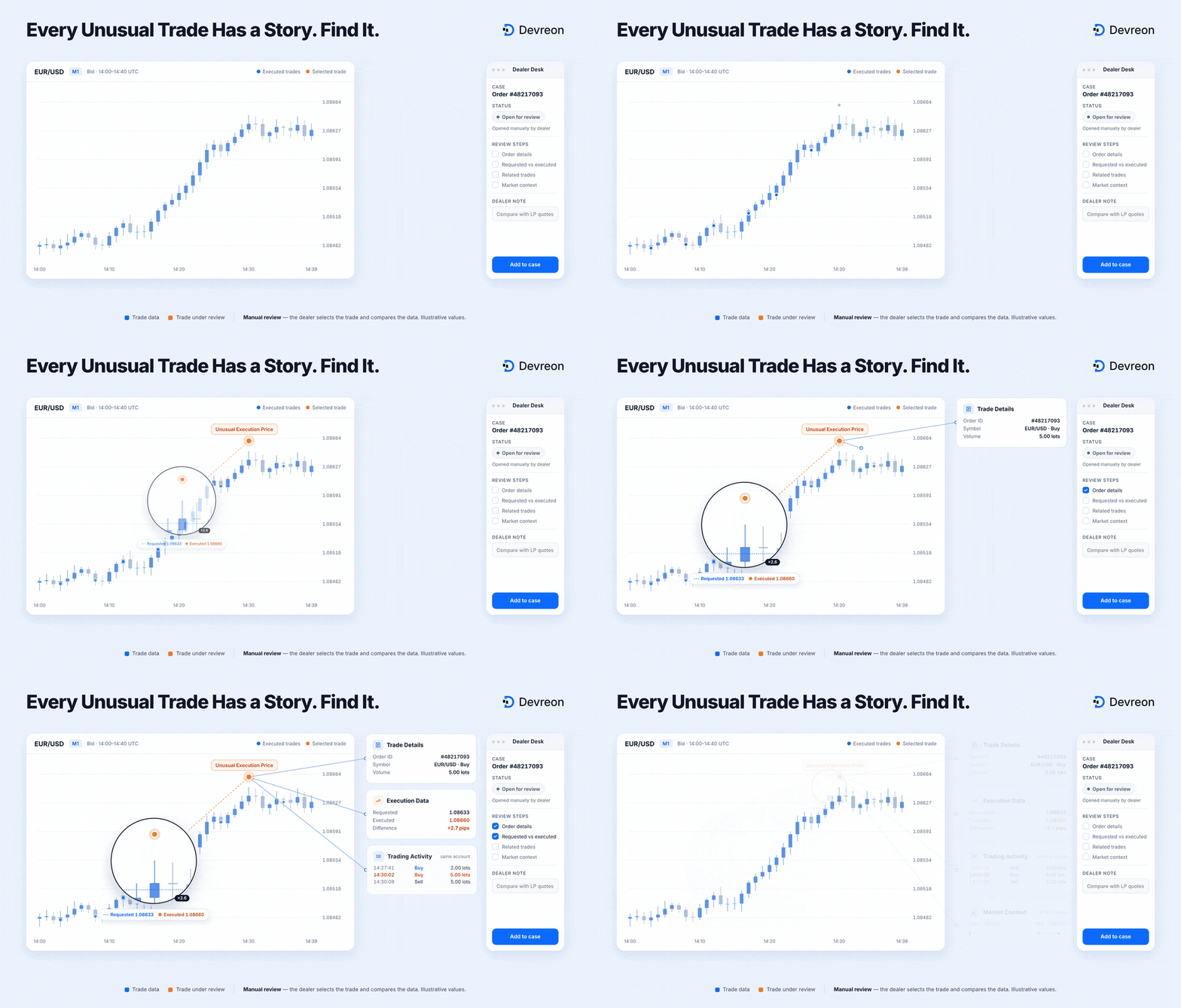
For example, if one client repeatedly receives unusual execution prices, your team needs tools to investigate the trades and understand what happened.
Good dealing tools make this work faster and help your team make decisions based on actual trading data.
Automated risk controls
When you have thousands of clients, you can’t monitor every position manually.
That’s why you need automated rules.
For example, you can set a maximum exposure limit for a particular instrument.
When that limit is reached, the system can trigger an alert or take a predefined action, such as routing additional exposure to a liquidity provider, if your setup supports it.
Don’t rely on your dealers to catch every problem manually.
Give them tools that monitor risks continuously and react according to your rules.
The earlier you put these controls in place, the easier it will be to manage risk as your brokerage grows.
Set up monitoring, reporting, and trading data management
Launching your MT4/MT5 servers is just the beginning.
You also need to know when something goes wrong and have the data to understand why.
External and internal server monitoring
There are two ways to monitor your trading infrastructure:
- External monitoring checks whether your servers are reachable from outside, without accessing your infrastructure. For example, Devreon Zero Trust Monitoring.
- Internal monitoring tracks server performance, logs, plugins, and internal processes. For example, Devreon Deep Server Monitoring.
You need both to see what’s happening inside and outside your trading servers.
Trading performance and error monitoring
An online server doesn’t always mean trading is working properly.
Orders may be delayed or rejected, plugins may fail, or price feeds may stop updating.
Monitor execution times, rejected requests, errors, and quote delivery to catch problems before clients start complaining.
Custom alerts and monitoring rules
You can’t watch dashboards all day. Let your monitoring system alert you when something needs attention.
For example, if order processing takes longer than your defined limit, your team receives a notification.
Don’t create alerts for everything. Focus on problems that require action.
Otherwise, important warnings can get lost in the noise.
Reporting, logs, and historical trading data
You need three types of information:
- Reporting. Shows trading activity, financial results, and operational performance.
- Logs. Record system events and errors to help investigate problems.
- Historical tick data. Stores past price changes so you can analyze trades and resolve disputes.
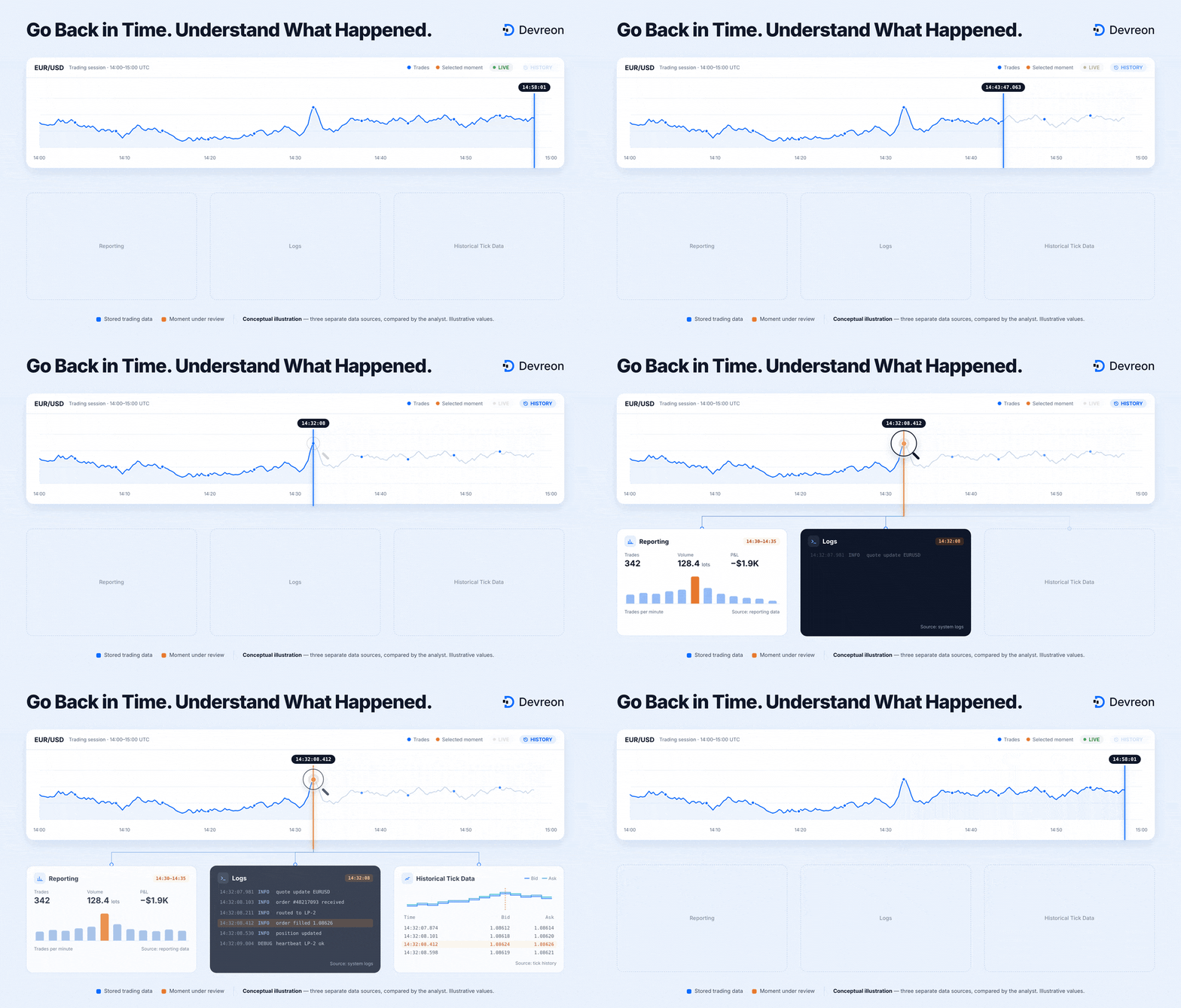
Make sure this information is stored properly and easy to access when needed.
Monitoring helps you detect problems.
Reporting and historical data help you understand what happened.
Both should be in place from day one.
Test your brokerage infrastructure before launch
Just because your MT5 server, Bridge, and CRM work separately doesn’t mean they’ll work well together.
Before going live, test the entire system under real trading conditions.
Here’s what I recommend checking:
- Connectivity. Make sure MT4/MT5, Bridge, liquidity providers, and CRM stay connected.
- Order execution. Place test trades and check that orders are routed, executed, and recorded correctly.
- Risk rules. Verify exposure limits, leverage settings, and automated controls.
- Load testing. Simulate heavy trading activity and check for delays and errors.
- Failover and recovery. Simulate server or liquidity connection failures and test recovery.
- Monitoring. Trigger test errors and check that alerts reach your team.
- Data consistency. Make sure accounts, trades, and balances match across your systems.
Pay special attention to load testing.
At Devreon, we work with brokers processing millions of trades daily.
We’ve learned how important it is to test the Bridge and trading servers together, not just separately.
Technical pre-launch checklist
Before accepting your first live trades, make sure you can check every box:
A successful connection isn’t the same as a successful test.
Make sure your systems work together under pressure, not just when everything is quiet.
How Devreon helps brokers build and scale their technology
At Devreon, we develop software for MT4/MT5 brokers. We help them launch, improve, and scale their trading infrastructure.
Our work covers five main areas:
- Trade execution. Bridge technology for liquidity connectivity and order routing.
- Risk management. Tools for exposure monitoring, leverage control, and trade analysis.
- Monitoring. External and internal server monitoring with alerts.
- Reporting and data. Trading reports, data storage, and integrations.
- Custom engineering. Software developed for specific brokerage needs.
Our products are modular.
You don’t need to replace your existing infrastructure or buy everything at once.
You can start with one tool and add others as your business grows.
Building or scaling your MT4/MT5 brokerage? Talk to Devreon about your technology needs.
Frequently Asked Questions
What technology do you need to start a Forex brokerage?
A trading platform is only the starting point.
To run a Forex brokerage, you need several systems working together:
- MT4 or MT5 to manage trading accounts and orders.
- Trading servers to run your platform.
- Liquidity providers and Bridge to receive prices and execute trades externally.
- CRM and Client Portal to manage registration, accounts, and payments.
- Risk Management to control exposure and leverage.
- Monitoring and Reporting to detect problems and analyze trading activity.
You don’t need the most expensive solutions from day one.
Start with what your business model requires, but choose technology that can grow with you.
Do you need both MT4 and MT5?
No. You can successfully run a brokerage with just one platform.
MT4 remains popular among traders who use older Expert Advisors and custom indicators.
MT5 offers a more modern architecture, more order types, and broader trading capabilities.
Devreon’s advice. If you’re starting from scratch, look at MT5 first. It’s generally a better choice for a new brokerage. But if your target clients specifically want MT4, consider offering both.
Remember that two platforms mean separate infrastructure, integrations, and maintenance costs.
What is a Forex Bridge, and why do brokers need one?
Think of a Bridge as the connection between your trading platform and the outside liquidity market.
When a client clicks Buy or Sell, the Bridge can send that order to a liquidity provider, receive the execution result, and pass it back to MT4/MT5.
A Bridge also helps you:
- Connect to multiple liquidity providers.
- Configure order routing for A-Book and Hybrid execution.
- Manage price feeds and execution settings.
For a broker that sends trades to external liquidity providers, a reliable Bridge is an essential part of the infrastructure.
How do you connect MT4/MT5 to liquidity providers?
First, choose a liquidity provider that supports the instruments and trading conditions you want to offer.
Then connect it to your MT4/MT5 platform through a compatible Bridge.
Before going live, check three things:
- Price feeds. Are quotes updating correctly and without interruptions?
- Execution. Are orders reaching the provider and returning the correct results?
- Performance. Does the connection remain stable during busy market hours?
One important point. A successful connection doesn’t guarantee good execution. Always test how the complete system performs under real trading conditions.
What risk management tools does a new broker need?
Even a small brokerage can face significant trading risks, especially when using a B-Book or Hybrid model.
I’d start with three things:
- Exposure monitoring. See how much market risk you’re holding across clients and instruments.
- Leverage management. Control how much leverage clients can use under different conditions.
- Automated risk rules. Set limits and trigger alerts or actions when risks become too high.
For example, imagine many clients suddenly open large positions on gold. You need to see your total exposure immediately and know when it exceeds your limits.
Don’t wait until you have thousands of clients to start managing these risks.
How do you test Forex brokerage infrastructure before launch?
Don’t just check whether your MT5 server is online. Test what happens when real clients start trading.
I recommend testing three situations:
- Normal trading. Open and close positions, modify orders, and check that all systems exchange data correctly.
- Heavy trading. Simulate hundreds or thousands of simultaneous requests. Watch for delays, errors, and rejected orders.
- System failures. Disconnect a liquidity provider or simulate a server failure. Check how your infrastructure responds and recovers.
Also, verify risk rules, monitoring alerts, and reporting data.
At Devreon, we work with brokers processing millions of trades daily. One thing we’ve learned is that a system must be tested under pressure, not just when everything is running smoothly.
How can you scale a brokerage without replacing its technology?
The key is to plan for growth before you need it.
Imagine you launch with one MT5 server and a few hundred active traders. Two years later, you have several servers, more liquidity providers, and thousands of active clients.
You shouldn’t have to rebuild your entire infrastructure to support that growth.
Here’s what Devreon recommends:
- Choose servers and hosting that can support expansion.
- Use technology that supports multiple MT4/MT5 servers.
- Make sure your Bridge can handle increasing trading volumes.
- Choose modular tools that can be added or upgraded independently.